<?xml version="1.0" encoding="utf-8"?>
<feed xmlns="http://www.w3.org/2005/Atom">

  <title><![CDATA[Desmond Brand]]></title>
  <link href="http://desmondbrand.com/atom.xml" rel="self"/>
  <link href="http://desmondbrand.com/"/>
  <updated>2013-03-24T18:51:15-07:00</updated>
  <id>http://desmondbrand.com/</id>
  <author>
    <name><![CDATA[Desmond Brand]]></name>
    
  </author>
  <generator uri="http://octopress.org/">Octopress</generator>

  
  <entry>
    <title type="html"><![CDATA[Using nginx as a reverse proxy for speedy App Engine development]]></title>
    <link href="http://desmondbrand.com/blog/2011/12/05/using-nginx-as-a-reverse-proxy-for-speedy-app-engine-development/"/>
    <updated>2011-12-05T18:24:00-08:00</updated>
    <id>http://desmondbrand.com/blog/2011/12/05/using-nginx-as-a-reverse-proxy-for-speedy-app-engine-development</id>
    <content type="html"><![CDATA[<p><em>Context:</em> I recently posted about <a href="http://desmondbrand.com/blog/2011/11/15/speed-up-your-app-engine-dev-server-with-an-apache-reverse-proxy">using Apache as a reverse-proxy for Google App Engine development</a>. See that post for the motivation for monkeying with Real Web Servers when what you really want to be doing is developing your GAE app. The quick version is that you can reduce your local pageload time by a factor of 20 or more, depending how many static assets (images, javascript, stylesheets) your app has.</p>

<p>Proxying with Apache was a big improvement using the single-threaded, I/O blocking <code>dev_appserver.py</code> directly, but it was by no means perfect. I noticed that if I hadn&#8217;t hit Apache for a while, it&#8217;d take roughly 10 seconds before my next request would be served. If you know what you&#8217;re doing, it&#8217;s probably possible to configure Apache not to do this. But I don&#8217;t know what I&#8217;m doing, and Apache configuration isn&#8217;t exactly friendly.</p>

<p><img class="right" src="http://desmondbrand.com/images/nginx-logo.png" title="Now that is a badass logo" ></p>

<p>Instead, I switched to using <a href="http://wiki.nginx.org/Main">nginx</a>, which is sometimes described as a reverse proxy first and webserver second. It&#8217;s insanely fast at serving static files, uses little memory, and configuring it turned out to be easy. Also, who can resist that logo?</p>

<h3>How to set up nginx as a reverse proxy</h3>

<p>First, install nginx. With homebrew on OS X this is just <code>brew install nginx</code>.</p>

<p>Next, we need to configure nginx to work as a reverse proxy. The following configuration did the trick for me. I put this file at <code>/usr/local/etc/nginx/kadev.conf</code>, as the <code>include</code> refers to a file <code>mime.types</code> in that directory.</p>

<p>Notice how <a href="http://c2.com/cgi/wiki?DontRepeatYourself">DRY</a> this config is compared to the Apache equivalent. It&#8217;s really easy to add extra <code>server</code> sections if you have multiple development servers.</p>

<figure class='code'><figcaption><span>/usr/local/etc/nginx/kadev.conf  </span></figcaption>
 <div class="highlight"><table><tr><td class="gutter"><pre class="line-numbers"><span class='line-number'>1</span>
<span class='line-number'>2</span>
<span class='line-number'>3</span>
<span class='line-number'>4</span>
<span class='line-number'>5</span>
<span class='line-number'>6</span>
<span class='line-number'>7</span>
<span class='line-number'>8</span>
<span class='line-number'>9</span>
<span class='line-number'>10</span>
<span class='line-number'>11</span>
<span class='line-number'>12</span>
<span class='line-number'>13</span>
<span class='line-number'>14</span>
<span class='line-number'>15</span>
<span class='line-number'>16</span>
<span class='line-number'>17</span>
<span class='line-number'>18</span>
<span class='line-number'>19</span>
<span class='line-number'>20</span>
<span class='line-number'>21</span>
<span class='line-number'>22</span>
<span class='line-number'>23</span>
<span class='line-number'>24</span>
<span class='line-number'>25</span>
<span class='line-number'>26</span>
</pre></td><td class='code'><pre><code class='nginx'><span class='line'><span class="k">worker_processes</span>        <span class="mi">1</span><span class="p">;</span>
</span><span class='line'>
</span><span class='line'><span class="k">events</span> <span class="p">{</span>
</span><span class='line'>    <span class="kn">worker_connections</span>  <span class="mi">1024</span><span class="p">;</span>
</span><span class='line'><span class="p">}</span>
</span><span class='line'>
</span><span class='line'><span class="k">http</span> <span class="p">{</span>
</span><span class='line'>    <span class="kn">include</span>             <span class="s">mime.types</span><span class="p">;</span>
</span><span class='line'>    <span class="kn">default_type</span>        <span class="s">application/octet-stream</span><span class="p">;</span>
</span><span class='line'>    <span class="kn">sendfile</span>            <span class="no">on</span><span class="p">;</span>
</span><span class='line'>    <span class="kn">keepalive_timeout</span>   <span class="mi">65</span><span class="p">;</span>
</span><span class='line'>
</span><span class='line'>    <span class="kn">server</span> <span class="p">{</span>
</span><span class='line'>        <span class="kn">listen</span>          <span class="n">khanacademy.dev</span><span class="p">:</span><span class="mi">80</span><span class="p">;</span>
</span><span class='line'>        <span class="kn">server_name</span>     <span class="s">khanacademy.dev</span><span class="p">;</span>
</span><span class='line'>        <span class="kn">root</span>            <span class="s">/Users/dmnd/Projects/khan/src/stable</span><span class="p">;</span>
</span><span class='line'>
</span><span class='line'>        <span class="kn">location</span> <span class="s">/</span> <span class="p">{</span>
</span><span class='line'>            <span class="kn">try_files</span>   <span class="nv">$uri</span>   <span class="s">@proxy</span><span class="p">;</span>
</span><span class='line'>        <span class="p">}</span>
</span><span class='line'>
</span><span class='line'>        <span class="kn">location</span> <span class="s">@proxy</span> <span class="p">{</span>
</span><span class='line'>            <span class="kn">proxy_pass</span>   <span class="s">http://127.0.0.1:8080</span><span class="p">;</span>
</span><span class='line'>        <span class="p">}</span>
</span><span class='line'>    <span class="p">}</span>
</span><span class='line'><span class="p">}</span>
</span></code></pre></td></tr></table></div></figure>


<p>Line 19 is where the magic happens. It tells nginx to check first for a file matching the path for a request. If a file exists, nginx serves it directly. Otherwise, nginx forwards the request to the proxied server, in this case creaky old <code>dev_appserver.py</code>.</p>

<p>Finally, run nginx with <code>sudo nginx -c ~/path/to/config/file.conf</code>. <code>sudo</code> is needed to listen on port 80. If you&#8217;re running on another port, you don&#8217;t need it.</p>

<p>Now you should be able use your proxy to serve your static files quickly so you can get on with development.</p>

<h3>Debugging tips</h3>

<p>If something doesn&#8217;t work, here are some things to try.</p>

<ul>
<li><p>Check that your configuration is valid with <code>nginx -c ~/path/to/config/file.conf -t</code>.</p></li>
<li><p>The above configuration tells nginx to listen on port 80, so if you have Apache running you will need to disable it first. On OS X, open System Preferences, select Sharing, then uncheck &#8220;Web Sharing&#8221;. Or you can tell it to exit with <code>sudo apachectl -k stop</code>.</p></li>
<li><p>If you installed with <code>brew install nginx</code>, logs will be stored at <code>/usr/local/Cellar/nginx/1.0.7/logs</code> by default. If something isn&#8217;t working, <code>tail -f</code> the files in that directory.</p></li>
</ul>


<p>If you needed to do anything else to get it running, please leave a comment to help the next person.</p>
]]></content>
  </entry>
  
  <entry>
    <title type="html"><![CDATA[Speed up your App Engine dev server with an Apache reverse proxy]]></title>
    <link href="http://desmondbrand.com/blog/2011/11/15/speed-up-your-app-engine-dev-server-with-an-apache-reverse-proxy/"/>
    <updated>2011-11-15T21:59:00-08:00</updated>
    <id>http://desmondbrand.com/blog/2011/11/15/speed-up-your-app-engine-dev-server-with-an-apache-reverse-proxy</id>
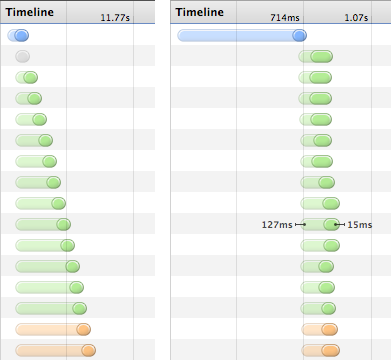
    <content type="html"><![CDATA[<p>When using the Google App Engine SDK in development mode, you have probably noticed that <code>dev_appserver.py</code> is incredibly slow. This is because all requests &#8211; even requests for static files like javascript, stylesheets or images &#8211; are handled sequentially by a single thread. Take a look at the timeline below. Does the left side look familiar?</p>

<p>At <a href="http://www.khanacademy.org">Khan Academy</a>, a single pageload in development mode might end up requesting as many as 100 different resources. This takes <code>dev_appserver.py</code> more than 35 seconds to serve, which sucks. Coupled with <a href="https://bugs.webkit.org/show_bug.cgi?id=30862">Webkit&#8217;s annoyingly aggressive cache</a>, this can really kill your <a href="http://xkcd.com/303/">productivity</a>.</p>

<p><img class="center" src="http://desmondbrand.com/images/gae-proxy-before-after.png" title="Chrome timelines before and after serving static assets from Apache" ></p>

<p>It&#8217;s possible to get a big speed boost by setting up Apache as a <a href="http://en.wikipedia.org/wiki/Reverse_proxy">reverse proxy</a> in front of your dev server. All requests for static assets will be handled by Apache, which is blazing fast compared to <code>dev_appserver.py</code>. The 35 second request above is fulfilled in only 2 seconds, with most of the static files loading in parallel (see the right side).</p>

<p><em>Update 2011-11-15</em>: It turns out nginx is even quicker at serving static files, uses less memory, and easier to configure too! From here on I recommend <a href="http://desmondbrand.com/blog/2011/12/05/using-nginx-as-a-reverse-proxy-for-speedy-app-engine-development/">reading this post instead</a>, which tells you how to set up the same thing with <a href="http://wiki.nginx.org/Main">nginx</a> rather than Apache.</p>

<h3>How to set this up</h3>

<p>First, enable Virtual Hosts in Apache. Edit <code>/etc/apache2/httpd.conf</code> and go to line 623. Uncomment the line for vhosts, so it looks like the following.</p>

<figure class='code'><figcaption><span>/etc/apache2/httpd.conf   </span></figcaption>
 <div class="highlight"><table><tr><td class="gutter"><pre class="line-numbers"><span class='line-number'>623</span>
<span class='line-number'>624</span>
</pre></td><td class='code'><pre><code class='apache'><span class='line'><span class="c"># Virtual hosts</span>
</span><span class='line'><span class="nb">Include</span> <span class="sx">/private/etc/apache2/extra/httpd-vhosts.conf</span>
</span></code></pre></td></tr></table></div></figure>


<p>Next, open <code>/etc/apache2/extra/httpd-vhosts.conf</code> and insert something like the following. Fellow KA devs shouldn&#8217;t have to edit much, but if you&#8217;re working on a different app you will obviously have to change the static directories. Look in <code>app.yaml</code> to see the full list of statically served paths.</p>

<figure class='code'><figcaption><span>/etc/apache2/extra/httpd-vhosts.conf  </span></figcaption>
 <div class="highlight"><table><tr><td class="gutter"><pre class="line-numbers"><span class='line-number'>1</span>
<span class='line-number'>2</span>
<span class='line-number'>3</span>
<span class='line-number'>4</span>
<span class='line-number'>5</span>
<span class='line-number'>6</span>
<span class='line-number'>7</span>
<span class='line-number'>8</span>
<span class='line-number'>9</span>
<span class='line-number'>10</span>
<span class='line-number'>11</span>
<span class='line-number'>12</span>
<span class='line-number'>13</span>
<span class='line-number'>14</span>
<span class='line-number'>15</span>
<span class='line-number'>16</span>
<span class='line-number'>17</span>
<span class='line-number'>18</span>
<span class='line-number'>19</span>
<span class='line-number'>20</span>
<span class='line-number'>21</span>
<span class='line-number'>22</span>
<span class='line-number'>23</span>
<span class='line-number'>24</span>
<span class='line-number'>25</span>
<span class='line-number'>26</span>
<span class='line-number'>27</span>
<span class='line-number'>28</span>
<span class='line-number'>29</span>
<span class='line-number'>30</span>
<span class='line-number'>31</span>
<span class='line-number'>32</span>
<span class='line-number'>33</span>
<span class='line-number'>34</span>
<span class='line-number'>35</span>
<span class='line-number'>36</span>
<span class='line-number'>37</span>
</pre></td><td class='code'><pre><code class='apache'><span class='line'><span class="nt">&lt;VirtualHost</span> <span class="s">*:80</span><span class="nt">&gt;</span>
</span><span class='line'>    <span class="nb">ServerName</span> khanacademy.local
</span><span class='line'>
</span><span class='line'>    <span class="c"># don&#39;t proxy these paths. Instead, serve them directly from apache</span>
</span><span class='line'>    <span class="nb">ProxyPass</span> <span class="sx">/javascript</span> !
</span><span class='line'>    <span class="nb">Alias</span> <span class="sx">/javascript</span> <span class="s2">&quot;/Users/dmnd/Projects/khan/src/stable/javascript&quot;</span>
</span><span class='line'>
</span><span class='line'>    <span class="nb">ProxyPass</span> <span class="sx">/stylesheets</span> !
</span><span class='line'>    <span class="nb">Alias</span> <span class="sx">/stylesheets</span> <span class="s2">&quot;/Users/dmnd/Projects/khan/src/stable/stylesheets&quot;</span>
</span><span class='line'>
</span><span class='line'>    <span class="nb">ProxyPass</span> <span class="sx">/images</span> !
</span><span class='line'>    <span class="nb">Alias</span> <span class="sx">/images</span> <span class="s2">&quot;/Users/dmnd/Projects/khan/src/stable/images&quot;</span>
</span><span class='line'>
</span><span class='line'>    <span class="nb">ProxyPass</span> <span class="sx">/gae_bingo/static</span> !
</span><span class='line'>    <span class="nb">Alias</span> <span class="sx">/gae_bingo/static</span> <span class="s2">&quot;/Users/dmnd/Projects/khan/src/stable/gae_bingo/static&quot;</span>
</span><span class='line'>
</span><span class='line'>    <span class="nb">ProxyPass</span> <span class="sx">/gae_mini_profiler/static</span> !
</span><span class='line'>    <span class="nb">Alias</span> <span class="sx">/gae_mini_profiler/static</span> <span class="s2">&quot;/Users/dmnd/Projects/khan/src/stable/gae_mini_profiler/static&quot;</span>
</span><span class='line'>
</span><span class='line'>    <span class="nb">ProxyPass</span> <span class="sx">/khan-exercises</span> !
</span><span class='line'>    <span class="nb">Alias</span> <span class="sx">/khan-exercises</span> <span class="s2">&quot;/Users/dmnd/Projects/khan/src/stable/khan-exercises&quot;</span>
</span><span class='line'>
</span><span class='line'>    <span class="c"># everything else gets proxied through to the dev server</span>
</span><span class='line'>    <span class="nb">ProxyPass</span> / http://localhost:8080/
</span><span class='line'>
</span><span class='line'>    <span class="c"># let apache rewrite URLs in response headers</span>
</span><span class='line'>    <span class="nb">ProxyPassReverse</span> / http://localhost:8080/
</span><span class='line'>
</span><span class='line'>    <span class="c"># give apache some permissions to the src directory so it can serve static files</span>
</span><span class='line'>    <span class="nt">&lt;Directory</span> <span class="s">&quot;/Users/dmnd/Projects/khan/src&quot;</span><span class="nt">&gt;</span>
</span><span class='line'>        <span class="nb">Options</span> Indexes FollowSymLinks Includes ExecCGI
</span><span class='line'>        <span class="nb">AllowOverride</span> <span class="k">All</span>
</span><span class='line'>        <span class="nb">Order</span> allow,deny
</span><span class='line'>        <span class="nb">Allow</span> from <span class="k">all</span>
</span><span class='line'>        <span class="nb">AddDefaultCharset</span> utf-8
</span><span class='line'>    <span class="nt">&lt;/Directory&gt;</span>
</span><span class='line'><span class="nt">&lt;/VirtualHost&gt;</span>
</span></code></pre></td></tr></table></div></figure>


<p>Finally, map the <code>ServerName</code> you picked to localhost by editing your <code>/etc/hosts</code> file. See line 12 below.</p>

<figure class='code'><figcaption><span>/etc/hosts </span></figcaption>
<div class="highlight"><table><tr><td class="gutter"><pre class="line-numbers"><span class='line-number'>1</span>
<span class='line-number'>2</span>
<span class='line-number'>3</span>
<span class='line-number'>4</span>
<span class='line-number'>5</span>
<span class='line-number'>6</span>
<span class='line-number'>7</span>
<span class='line-number'>8</span>
<span class='line-number'>9</span>
<span class='line-number'>10</span>
<span class='line-number'>11</span>
<span class='line-number'>12</span>
</pre></td><td class='code'><pre><code class=''><span class='line'>##
</span><span class='line'># Host Database
</span><span class='line'>#
</span><span class='line'># localhost is used to configure the loopback interface
</span><span class='line'># when the system is booting.  Do not change this entry.
</span><span class='line'>##
</span><span class='line'>127.0.0.1   localhost
</span><span class='line'>255.255.255.255 broadcasthost
</span><span class='line'>::1             localhost
</span><span class='line'>fe80::1%lo0 localhost
</span><span class='line'># Easy access to app engine dev server
</span><span class='line'>127.0.0.1   khanacademy.local</span></code></pre></td></tr></table></div></figure>


<p>This allows you to access your dev server via something other than localhost, which is needed for the virtual host to work. If you don&#8217;t already have <code>--address=0.0.0.0</code> as a parameter to <code>dev_appserver.py</code> <a href="http://code.google.com/appengine/docs/python/tools/devserver.html#Command_Line_Arguments">you will need to add this</a>.</p>

<p>Also, Apache needs to be enabled - the easiest way to do this is to go to Sharing under System Preferences and check the &#8220;Web Sharing&#8221; item. If you already have it enabled, you may need to clear and check it again to force a restart. If it doesn&#8217;t start, check your config syntax with <code>apachectl -St</code>.</p>

<p>This setup should work on OS X Lion. Small changes might be needed for other OSes. If you had to tweak anything, mention it in the comments.</p>
]]></content>
  </entry>
  
  <entry>
    <title type="html"><![CDATA[Your own personal hgignore file]]></title>
    <link href="http://desmondbrand.com/blog/2011/10/06/your-own-personal-hgignore-file/"/>
    <updated>2011-10-06T12:28:00-07:00</updated>
    <id>http://desmondbrand.com/blog/2011/10/06/your-own-personal-hgignore-file</id>
    <content type="html"><![CDATA[<p>Sometimes people don&#8217;t agree on the contents of the tracked .hgignore file in the repository root. For example, I don&#8217;t like having *orig in .hgignore as having backup files show up when I <code>grep</code> is annoying. I solved that problem by removing the *orig pattern and telling other repository users about <code>hg purge</code>.</p>

<p>But today I found another way to deal with different opinions for ignore files. <a href="http://mercurial.selenic.com/wiki/TipsAndTricks#Ignore_files_in_local_working_copy_only">Hidden away on the Mercurial wiki</a> is a nice tip about per-user hgignore files. In a repository&#8217;s hgrc you can reference an arbitrary file to be used in addition to the tracked .hgignore file. No more .hgignore wars!</p>
]]></content>
  </entry>
  
  <entry>
    <title type="html"><![CDATA[Caffeinated keeps your PC awake]]></title>
    <link href="http://desmondbrand.com/blog/2011/09/19/caffeinated-keeps-your-pc-awake/"/>
    <updated>2011-09-19T23:21:00-07:00</updated>
    <id>http://desmondbrand.com/blog/2011/09/19/caffeinated-keeps-your-pc-awake</id>
    <content type="html"><![CDATA[<p><img class="right" src="http://desmondbrand.com/images/caffeinated/menu.png">
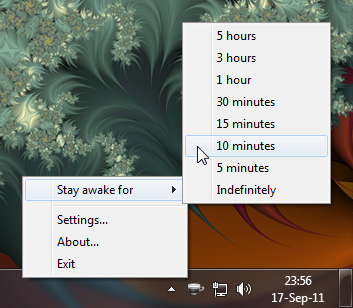
I use an excellent if simple program called <a href="http://lightheadsw.com/caffeine/">Caffeine</a> on OS X. Its only purpose is to temporarily prevent your computer from automically sleeping, or displaying the screensaver. A similar program called <a href="http://blogs.msdn.com/b/delay/archive/2009/09/30/give-your-computer-insomnia-free-tool-and-source-code-to-temporarily-prevent-a-machine-from-going-to-sleep.aspx">Insomnia</a> is available for Windows, but I dislike its UI.</p>

<p>So, I built <a href="http://desmondbrand.com/caffeinated">Caffeinated</a>. It&#8217;s a port of Caffeine that runs on Windows. The UI is straight-up lifted from Caffeine, and the entire program is pretty much just a usable wrapper around the <a href="http://msdn.microsoft.com/en-us/library/aa373208(VS.85).aspx">SetThreadExecutionState</a> function from the Windows API.</p>

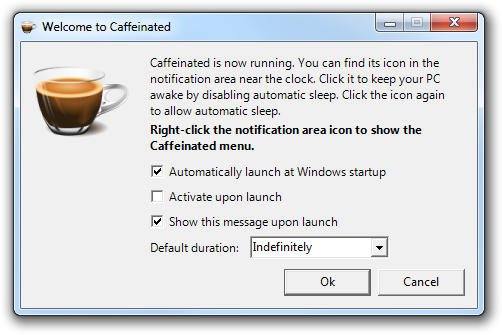
<p><img class="center" src="http://desmondbrand.com/images/caffeinated/settings.png"></p>

<p>Despite its simplicity, I find it useful, and maybe you will too. <a href="http://desmondbrand.com/caffeinated">Read more</a> about it, or <a href="https://github.com/downloads/dmnd/Caffeinated/Caffeinated-1.0.zip">download it</a> now.</p>

<div class="download-link"><a href="https://github.com/downloads/dmnd/Caffeinated/Caffeinated-1.0.zip"><img src="http://desmondbrand.com/images/download_64.png"><span>Download</span></a>
<div>
Version 1.0
<span style="margin-left: 2em">125 kB</span>
</div>
</div>


]]></content>
  </entry>
  
  <entry>
    <title type="html"><![CDATA[Django's inclusion_tag is not cached in AppEngine]]></title>
    <link href="http://desmondbrand.com/blog/2011/07/25/djangos-inclusion_tag-is-not-cached-in-appengine/"/>
    <updated>2011-07-25T23:33:00-07:00</updated>
    <id>http://desmondbrand.com/blog/2011/07/25/djangos-inclusion_tag-is-not-cached-in-appengine</id>
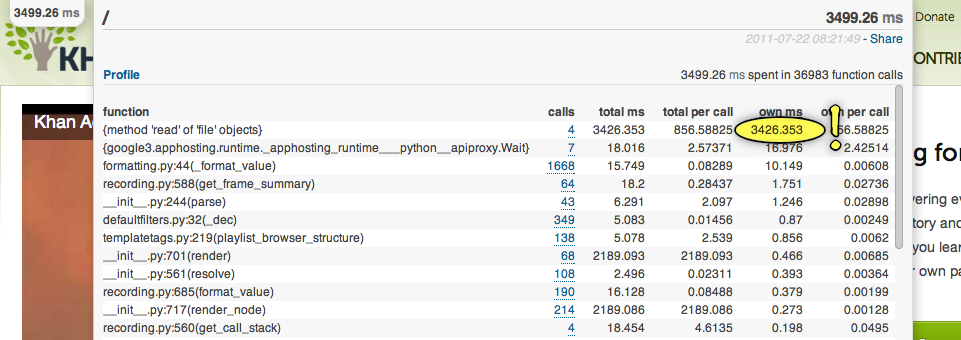
    <content type="html"><![CDATA[<p>Since we starting using the massively convenient <a href="http://bjk5.com/post/6944602865/google-app-engine-mini-profiler">GAE Mini Profiler</a>, we were surprised to discover that we spend a significant amount of time reading files from disk. Here&#8217;s a particulary extreme example:</p>

<p><a href="http://desmondbrand.com/images/gae_file_read_is_slow.png"><img src="http://desmondbrand.com/images/gae_file_read_is_slow.png" title="This is just stupidly slow" ></a></p>

<p>This was contrary to my understanding that App Engine tries to cache almost any code-related file read. After investigating, I found that App Engine does try to cache templates &#8211; see the <a href="http://code.google.com/p/googleappengine/source/browse/trunk/python/google/appengine/ext/webapp/template.py#76">source of template.py</a>. But it turns out this only works when you render a template directly with <code>webapp.template.render</code>, and <em>not</em> when you use Django&#8217;s <code>inclusion_tag</code>.</p>

<p>To verify this, I put together a basic page with some repeated template use and used <a href="http://www.brendangregg.com/DTrace/opensnoop_example.txt">opensnoop</a> (and after discovering that tool, I need to learn more about <a href="http://en.wikipedia.org/wiki/DTrace">DTrace</a>) to observe changes to the filesystem. Here&#8217;s the result when using <code>inclusion_tag</code>. You can see the template <code>simple_student_info.html</code> was loaded over and over again:</p>

<pre>
$ sudo opensnoop -n Python
  UID    PID COMM          FD PATH
  501  27864 Python         7 .
  501  27864 Python         6 /Applications/GoogleAppEngineLauncher.app/Contents/Resources/GoogleAppEngine-default.bundle/Contents/Resources/google_appengine/google/appengine/../../VERSION
  501  27864 Python         6 /var/folders/TX/TXTcFXvEFKKsTqfua-9AGE+++TI/-Tmp-/request.7SyMKG.tmp
  501  27864 Python         6 /var/folders/TX/TXTcFXvEFKKsTqfua-9AGE+++TI/-Tmp-/request.7SyMKG.tmp
  501  27864 Python         7 /Users/dmnd/projects/khan/src/desmond/templatetest.html
  501  27864 Python         7 /Users/dmnd/projects/khan/src/desmond/simple_student_info.html
  501  27864 Python         7 /Users/dmnd/projects/khan/src/desmond/simple_student_info.html
  501  27864 Python         7 /Users/dmnd/projects/khan/src/desmond/simple_student_info.html
  501  27864 Python         7 /Users/dmnd/projects/khan/src/desmond/simple_student_info.html
  501  27864 Python         7 /Users/dmnd/projects/khan/src/desmond/simple_student_info.html
</pre>


<p>When calling <code>webapp.template.render</code> directly, the template is only read once:</p>

<pre>
$ sudo opensnoop -n Python
  UID    PID COMM          FD PATH
  501  27864 Python         6 /Applications/GoogleAppEngineLauncher.app/Contents/Resources/GoogleAppEngine-default.bundle/Contents/Resources/google_appengine/google/appengine/../../VERSION
  501  27864 Python         6 /var/folders/TX/TXTcFXvEFKKsTqfua-9AGE+++TI/-Tmp-/request.j-MxJs.tmp
  501  27864 Python         6 /var/folders/TX/TXTcFXvEFKKsTqfua-9AGE+++TI/-Tmp-/request.j-MxJs.tmp
  501  27864 Python         7 .
  501  27864 Python         7 /Users/dmnd/projects/khan/src/desmond/templatetest.html
  501  27864 Python         7 .
  501  27864 Python         7 /Users/dmnd/projects/khan/src/desmond/simple_student_info.html
  501  27864 Python         7 .
  501  27864 Python         7 .
  501  27864 Python         7 .
  501  27864 Python         7 .
</pre>


<p>As we&#8217;re already using <code>inclusion_tag</code> all over the place, <a href="https://khanacademy.kilnhg.com/Repo/Website/Group/stable/File/template_cached.py?rev=d22e97b482ad">I added support for AppEngine&#8217;s template caching to it</a> replacing all usages of <code>django.template.Library</code> with my own subclass. You can use it by including <a href="https://khanacademy.kilnhg.com/Repo/Website/Group/stable/File/template_cached.py?rev=d22e97b482ad">this file</a> in your project, and changing the top of your <code>templatetags.py</code> files like so:</p>

<figure class='code'><figcaption><span>Without caching.py </span></figcaption>
 <div class="highlight"><table><tr><td class="gutter"><pre class="line-numbers"><span class='line-number'>1</span>
<span class='line-number'>2</span>
</pre></td><td class='code'><pre><code class='py'><span class='line'><span class="kn">from</span> <span class="nn">google.appengine.ext</span> <span class="kn">import</span> <span class="n">webapp</span>
</span><span class='line'><span class="n">register</span> <span class="o">=</span> <span class="n">webapp</span><span class="o">.</span><span class="n">template</span><span class="o">.</span><span class="n">create_template_register</span><span class="p">()</span>
</span></code></pre></td></tr></table></div></figure>


<figure class='code'><figcaption><span>With caching.py </span></figcaption>
 <div class="highlight"><table><tr><td class="gutter"><pre class="line-numbers"><span class='line-number'>1</span>
<span class='line-number'>2</span>
</pre></td><td class='code'><pre><code class='py'><span class='line'><span class="kn">import</span> <span class="nn">template_cached</span>
</span><span class='line'><span class="n">register</span> <span class="o">=</span> <span class="n">template_cached</span><span class="o">.</span><span class="n">create_template_register</span><span class="p">()</span>
</span></code></pre></td></tr></table></div></figure>


<p>Caveats: we&#8217;re still using Django 0.96, so there&#8217;s a chance this only applies to that version of Django on AppEngine.</p>
]]></content>
  </entry>
  
</feed>